yolo-data
| 简体中文 | English |
YOLO Data Agent | Governed Enterprise Analytics Platform
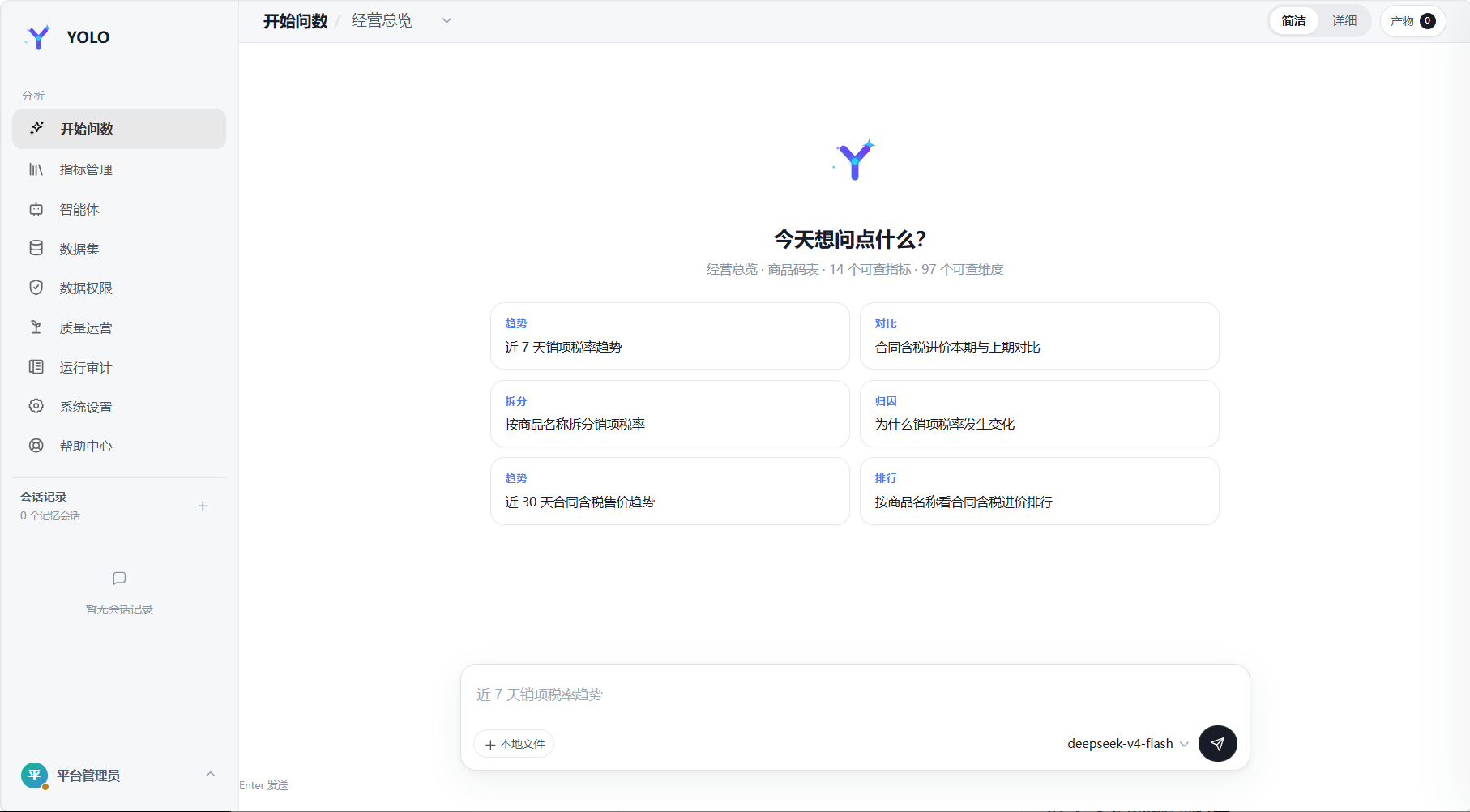
Ask business questions in natural language, then continue exploring the results in the same conversation—with business definitions, permissions, and execution rules managed by the platform.
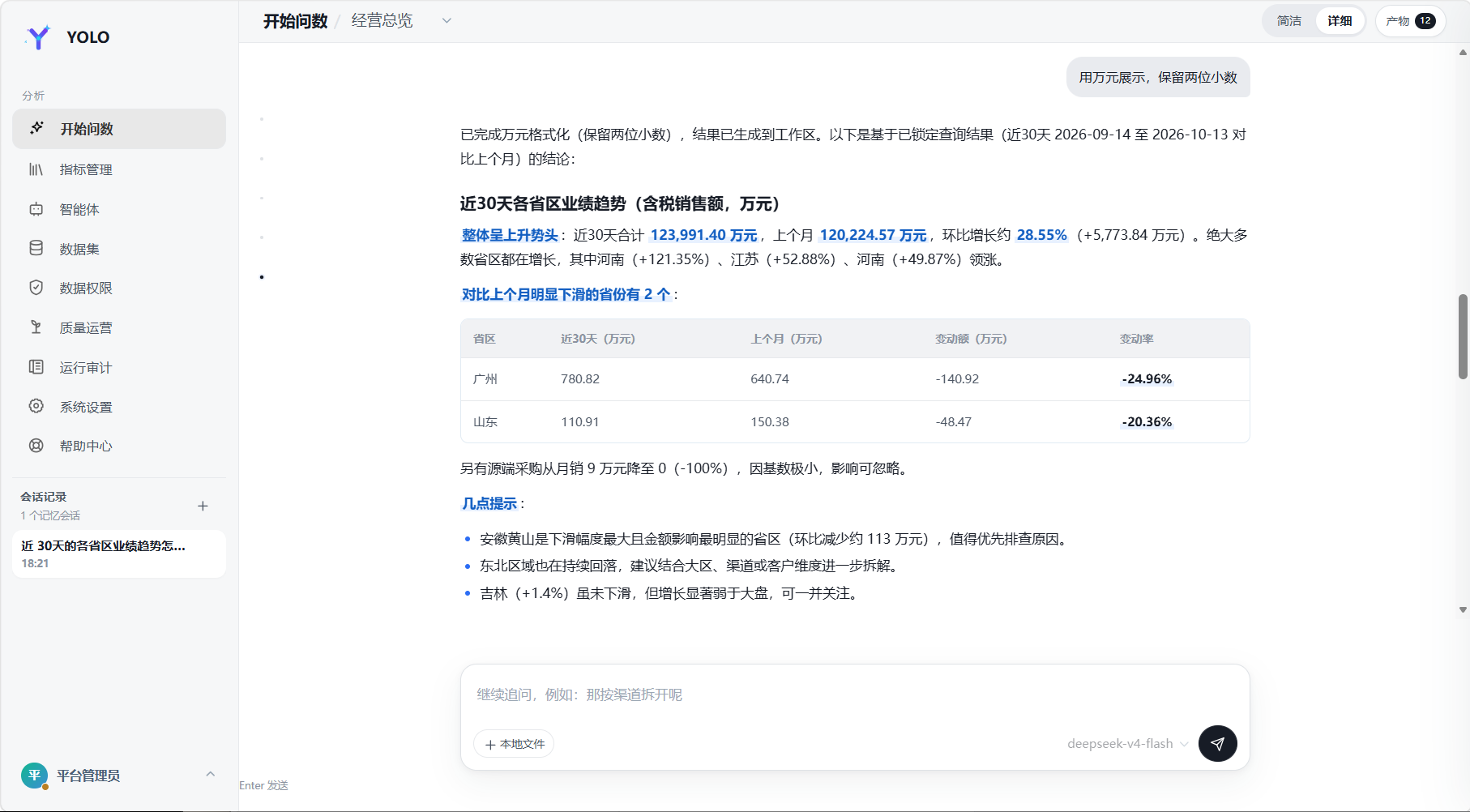
YOLO Data is a self-service analytics platform for business teams. Users can ask follow-up questions, compare and break down results, while the platform can request clarification when key intent is ambiguous.
It brings language models, metric definitions, business datasets, data permissions, conversation memory, workspace artifacts, feedback, and audit records into a governed analytics workflow.
How It Differs from a General-Purpose Agent
General-purpose agents are designed for open-ended tasks and may choose among tools dynamically. YOLO Data focuses on governed business-data analysis: the model interprets and explains, while the platform controls the available semantics, data scope, query validation, and execution.
| Dimension | General-purpose agent (typical) | YOLO Data Agent |
|---|---|---|
| Scope | Open-ended tasks and flexible tool use | Business questions within configured topics, metrics, and datasets |
| Data semantics | May infer meaning from schemas at runtime | Administrators configure field semantics, metric definitions, defaults, and topic scope |
| Query execution | May generate SQL or invoke general data tools | Contract-first: the model proposes structured intent; the platform validates and compiles read-only queries, without exposing raw SQL to the model |
| Access control | Often delegated to prompts, tool setup, or upstream services | Topic/metric/dataset grants and row/column policies are enforced server-side |
| Continuity and evidence | Often centered on conversation context and transient tool output | Conversations, result snapshots, workspace artifacts, feedback, and audit records support follow-up and review |
YOLO Data is not intended to replace general agents for every task. It provides a dedicated execution framework for analytics where definitions should be consistent, access must be governed, and results need to be reviewable. Skills and MCP extend integrations without bypassing query validation or data permissions.
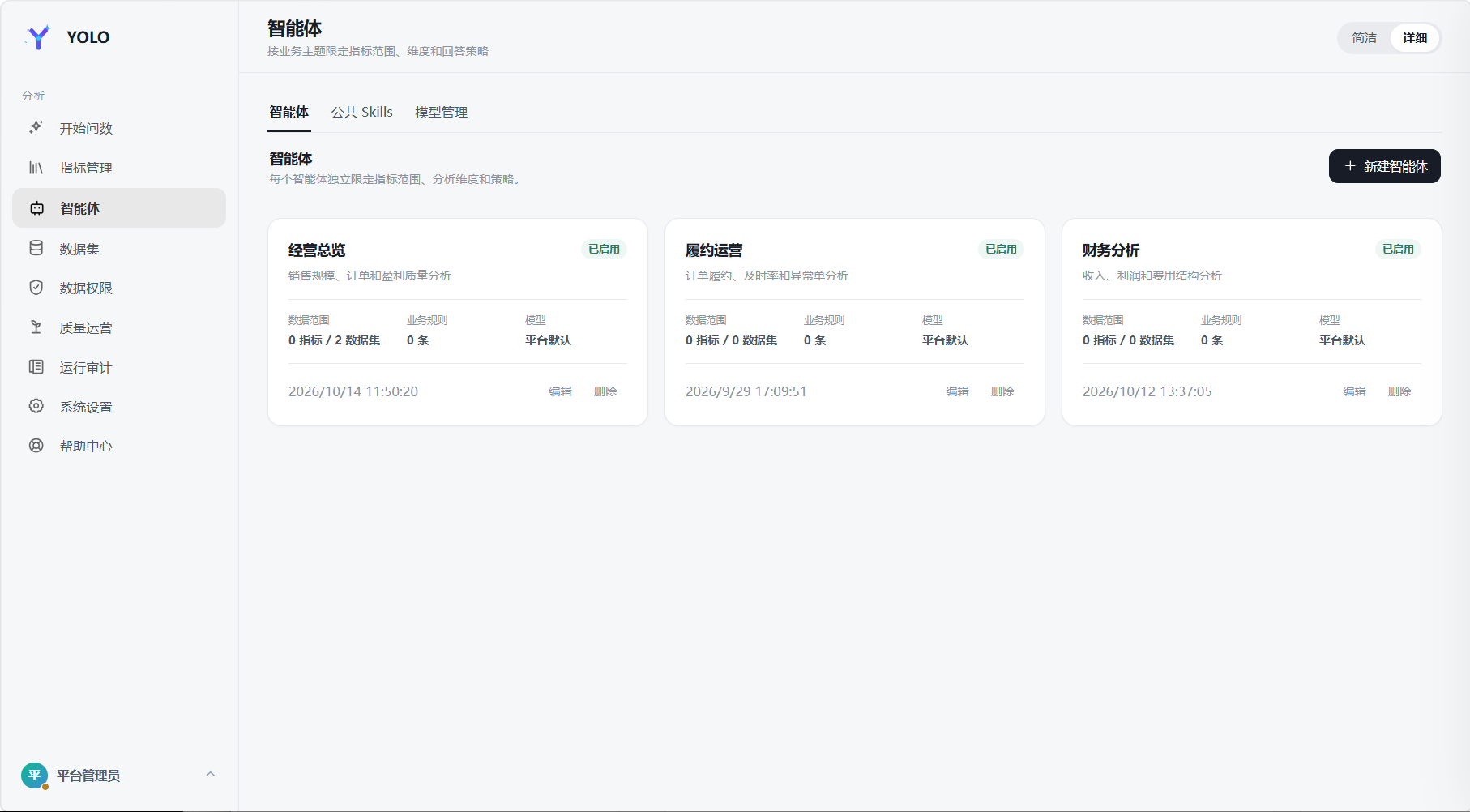
Screenshots
Core Capabilities
- Real-time metric system
- Connects to metric catalogs, definitions, dimensions, and aggregate queries.
- Does not copy the metric repository or treat caches as a source of truth.
- DataAgents
- Each topic independently configures prompts, models, Skills, metric scope, dataset scope, and default business definitions.
- Each topic acts as an independent business DataAgent.
- Unified model management
- Model creation, editing, deletion, encrypted credentials, Base URL, temperature, tool rounds, and platform defaults.
- A topic can bind multiple models and select its default runtime model.
- Business datasets
- Supports MySQL, TiDB, Doris, and PostgreSQL. PostgreSQL requires the optional
pgdriver; see PostgreSQL integration. - Generates read-only queries from field semantics without exposing raw SQL to the model.
- Supports schema synchronization, sampling, default enum domains, and query auditing.
- Smart recognition infers time fields, common metrics, and default time windows from samples before administrator approval.
- Supports MySQL, TiDB, Doris, and PostgreSQL. PostgreSQL requires the optional
- Contract-first queries
- Natural language is compiled into a condition ledger and query contract.
- Execution is allowed only after the contract is frozen.
- Time ranges, permissions, sorting, and result ordering are handled deterministically.
- General analysis pipeline
- Supports time buckets, derived formulas, multi-condition qualification, rollup counts, multi-key sorting, Top-N, and column projection.
- Data permissions
- Topic-, metric-, and dataset-level grants.
- Row policies override model conditions on the same field.
- Column policies support hiding and masking.
- Multi-turn conversations and workspaces
- Layered memory is isolated by user and topic. Long-term memory is maintained as a versioned Markdown handbook per user and DataAgent, with summary injection, on-demand retrieval, note consolidation, and compaction.
- Query results, code output, CSV, JSON, and XLSX files remain available as workspace artifacts.
- Follow-up questions prefer locked snapshots to avoid result drift from unnecessary re-querying.
- Skills
- Scans standard
SKILL.mddirectories. - Administrators can upload, enable, disable, delete, and inspect shared Skills.
- Supports pre-planning audits, planning constraints, and post-execution validation.
- Scans standard
- Observability
- A 14-stage DataAgent workflow including
REFLECTand bounded strategy replanning. - Streaming execution events, tool calls, query plans, LLM token usage, feedback, and knowledge gaps.
- A 14-stage DataAgent workflow including
- MCP integration
- Exposes
list_metrics,get_policy,get_snapshot,resolve_query, andexecute_queryover Streamable HTTP at/mcp. - Queries must resolve a contract before execution. See the MCP connector.
- Exposes
- Production hardening
- Prompt-injection sanitization, daily token budgets, session authentication, and Docker/Podman plus seccomp execution isolation.
- The default
inprocessbackend is suitable only for trusted environments. Multi-tenant deployments should useSANDBOX_BACKEND=containerorpodman.
Core Workflow
Business question → topic and semantic resolution → structured query contract
                   → field/time/permission validation → metric or read-only dataset execution
                   → stable result and explanation → memory, workspace, feedback, and audit
The governing principle is “model proposes, platform decides”: the model helps interpret and plan, while platform rules control the query contract, authorized scope, and execution.
Business Rules and Prompts
Prompts may control presentation and conclusions. Business terminology, enum mappings, formulas, and default definitions should live in:
- Topic prompts, such as
docs/theme-prompts/sales-operation.md - Dataset field descriptions
- Default value-domain configuration
Architecture
The memory context uses six layers: L0 system prompts, L1 shared organizational memory, L2 long-term user memory, L3 conversation window, L4 working memory, and L5 meta-memory and retrieval. Governance covers authentication, rate limits, token budgets, prompt sanitization, deterministic gates, auditing, and code isolation.
flowchart LR
  USER["Business user"] --> UI["YOLO Data Web UI"]
  ADMIN["Administrator"] --> UI

  UI --> API["Node.js HTTP API and NDJSON stream"]
  API --> AGENT["DataAgent orchestrator"]
  API --> CONFIG["Topics, models, datasets, and permissions"]

  MEMORY["Layered memory context\nL0 System · L1 Organization · L2 User\nL3 Conversation · L4 Working · L5 Retrieval"]
  AGENT --> MEMORY
  AGENT --> CONTRACT["Contract compilation and deterministic gates"]
  AGENT --> SKILL["Skills"]
  AGENT --> HARNESS["OpenAI-compatible model harness"]
  CONTRACT --> SOURCES["Metric system / business datasets"]
  AGENT --> OUTPUT["Workspace, charts, and analysis results"]
  AGENT --> REFLECT["Answer reflection"]
  API --> GOVERNANCE["Authentication, limits, budgets, audit, and security"]
  API --> MCP["Native MCP server"]
  AGENT --> SANDBOX["Code analysis sandbox"]
  AGENT --> EVAL["Evaluation and regression"]

  HARNESS --> LLM["DeepSeek or compatible LLM"]
  SOURCES --> PLATFORM["Data source schemas"]
  API --> DB["Platform database"]
  AGENT --> DB
  CONFIG --> DB
Requirements
- Node.js
>= 22.5(node:sqliteis used, so no separate platform database is required for a single-node setup) - npm or pnpm
- Python 3 for advanced analysis and file generation.
npm run setupcreates.venvand installspandas+openpyxl - Alternatively: Docker and Docker Compose for a complete environment without local Node.js or Python
- Optional external services: a metric platform, Doris/MySQL-compatible business database, and DeepSeek or another OpenAI-compatible model service
Quick Start
Option 1: Guided launcher (Linux / Windows)
git clone https://github.com/xiaour/yolo-data.git yolo-data
cd yolo-data
./start.sh
On Windows PowerShell, run ./start.ps1. The launcher guides first-time setup; run it again to start the app.
Option 2: Docker Compose
docker compose up -d --build
Open http://localhost:8088/ after startup. Configure model and data-source settings in yolo-conf.yaml as needed; change the default password after your first login. See Configuration below for details.
Keep machine-local passwords and API keys in .env (copy .env.example); do not commit it. Precedence is process environment > .env > yolo-conf.yaml.
For PostgreSQL data sources, see the PostgreSQL integration guide.
| Username | Display name | Role | Default password |
|---|---|---|---|
admin |
Platform Administrator | ADMIN |
yolo123456 |
east_manager |
Regional Manager | ANALYST |
yolo123456 |
channel_analyst |
Channel Analyst | ANALYST |
yolo123456 |
Administrators manage the platform. Analysts can access and query only the DataAgents granted to them.
Configuration
The root yolo-conf.yaml is the configuration file; its bilingual comments describe available settings. Non-empty environment variables override YAML, and built-in defaults are used otherwise. .env files are not loaded; provide secrets through environment variables. Set YOLO_CONF_FILE to use another configuration file.
OpenAI-compatible models
A DataAgent may use one or more models and select a default model. DeepSeek is recommended but not required.
Business datasets
MySQL, TiDB, Doris, and PostgreSQL are supported. The platform compiles queries from field semantics, and the model cannot submit raw SQL.
Smart recognition infers field roles (TIME, METRIC, DIMENSION, IDENTIFIER), aggregation methods, and default time windows. Administrators review inferred values before saving them.
Fields can be enabled or disabled individually and are enabled by default. Disabled fields cannot be used as dimensions, metrics, time fields, or filters. Schema synchronization preserves their enabled state.
API Example
Streaming query
curl -N -X POST http://localhost:8088/api/chat/query/stream \
  -H 'Content-Type: application/json' \
  -b cookie.txt \
  -d '{
    "themeId": 1,
    "question": "How did sales by channel change month over month in August?"
  }'
Security and Governance
- Enable session authentication before exposing the service externally.
- Raw SQL is never exposed to the model.
- Dataset queries use the platform’s read-only query builder.
- Row policies are enforced during execution; column policies are applied before browser delivery.
- Data-source passwords and model credentials are encrypted at rest.
- Critical operations are written to the audit log.
- Uploaded content is sanitized for prompt injection before entering model context.
- Daily token limits can be configured.
- The application supports
AUTH_MODE=dev/session; usesessionfor external deployments. The OIDC/JWT module is not integrated into application authentication, andAUTH_MODE=oidcprevents startup.
Production Notes
docker compose up -ddefaults toAUTH_MODE=sessionand binds only to127.0.0.1. External deployments must still change the default password and run behind an HTTPS reverse proxy. Direct HTTP access withNODE_ENV=productionwill fail login because Secure cookies are required.SANDBOX_BACKEND=inprocessis not a security boundary. Untrusted environments should use Docker or Podman with seccomp, no network, and a read-only root filesystem.- Platform state currently uses SQLite; deploy a single instance.
PLATFORM_DB_BACKEND=mysqlis not yet enabled in the application store. PostgreSQL business-data sources do not provide PostgreSQL storage for platform state. REFLECTION_ENABLEDandREFLECTION_MAX_REPLANcontrol answer reflection. Runnpm run evalor use/api/evalfor L1/L2/L3 regression evaluation.
Documentation
Contributing
- Keep business-specific mappings out of the platform core.
- Preserve contract-first execution and mandatory permission enforcement.
- Do not silently raise file-size baselines.
- Add tests for new workflows and regression fixes.
- Do not modify external metric-platform projects from this repository.
See docs/architecture.md for detailed design documentation.
License
Apache License 2.0. See LICENSE.